Screenshots




App details
- Version
- 2.1.40.1229
- Size
- 6.09 MB
- Updated
- May 10, 2010
- Requires
- Windows 7
- Language
- English | German | French | Japanese | C...
- License
- Trial version
- Developer
- xilisoft
- Category
- Windows OS
SoftPas in:
This product is also available in the following languages:
About Xilisoft iPod Rip
Download Xilisoft iPod Rip – Fast iPod/iPhone Sync Tool
Overview: Why Xilisoft iPod Rip Stands Out
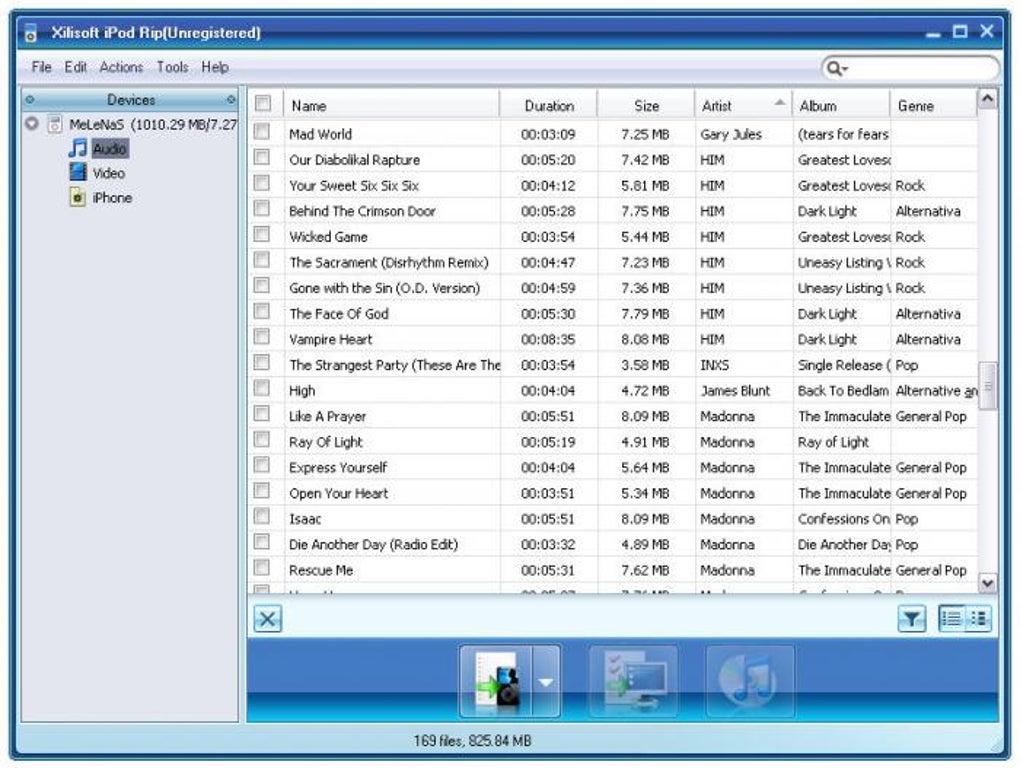
Xilisoft iPod Rip is a lightweight, dedicated utility that lets you synchronize music, videos, and playlists between your iPod or iPhone and your PC in both directions. Unlike iTunes, which tries to be an all‑in‑one media hub, Xilisoft iPod Rip focuses on speed and simplicity. Once you drag files or folders into the transfer list, the software begins copying instantly, handling batch operations with minimal user intervention. While the trial version imposes a few limits on batch size, the core experience remains smooth and responsive. The tool does not support podcasts, ringtones, or advanced library features such as Cover Flow, but it does cover the essentials—music, video, and playlist management—making it an ideal companion when you need a quick, hassle‑free way to move files off an iPod/iPhone onto your computer or vice‑versa. If you are searching for a free, secure, and fast solution that avoids the overhead of iTunes, Xilisoft iPod Rip offers a compelling alternative.
Key Features, Benefits & What Sets It Apart
Feature List
- Bidirectional sync of music, video, and playlists.
- Instantaneous transfer as soon as files are added to the queue.
- Batch processing for multiple files and folders.
- Simple drag‑and‑drop interface.
- Support for iPod Classic, iPod Nano, iPod Shuffle, iPhone, and iPad.
- Automatic detection of connected devices.
- Free trial with optional paid upgrade for unlimited batch size.
Benefits for Everyday Users
The biggest advantage of Xilisoft iPod Rip is its razor‑thin footprint. The installer is under 10 MB, and the program launches in seconds, letting you start copying files without waiting for iTunes to load its massive library. Because it focuses solely on file transfer, the software consumes far less RAM, making it suitable for older Windows PCs that struggle with newer iTunes versions. Its straightforward UI eliminates the learning curve associated with iTunes’ many tabs and preferences. For users who frequently borrow an iPod from a friend or need to back up a device before a software update, Xilisoft iPod Rip provides a fast, reliable safety net.
Pros & Cons
- Pros:
- Fast, real‑time syncing without unnecessary prompts.
- Lightweight and easy to install.
- Supports a wide range of iPod models and iPhones.
- Playlist transfer works flawlessly.
- Free trial available for testing.
- Cons:
- No support for podcasts, ringtones, or Cover Flow.
- Trial version limits batch size.
- Lacks advanced library organization tools found in iTunes.
Installation, Usage & Compatibility Guide
Step‑by‑Step Installation
1. Download the installer from the official Xilisoft website. The file is a small .exe for Windows; Mac users can use the provided .dmg (beta).
2. Run the installer and follow the on‑screen prompts. Accept the license agreement and choose the default installation folder to keep the process simple.
3. After installation, launch Xilisoft iPod Rip. The program will automatically detect any connected iPod or iPhone.
How to Sync Files
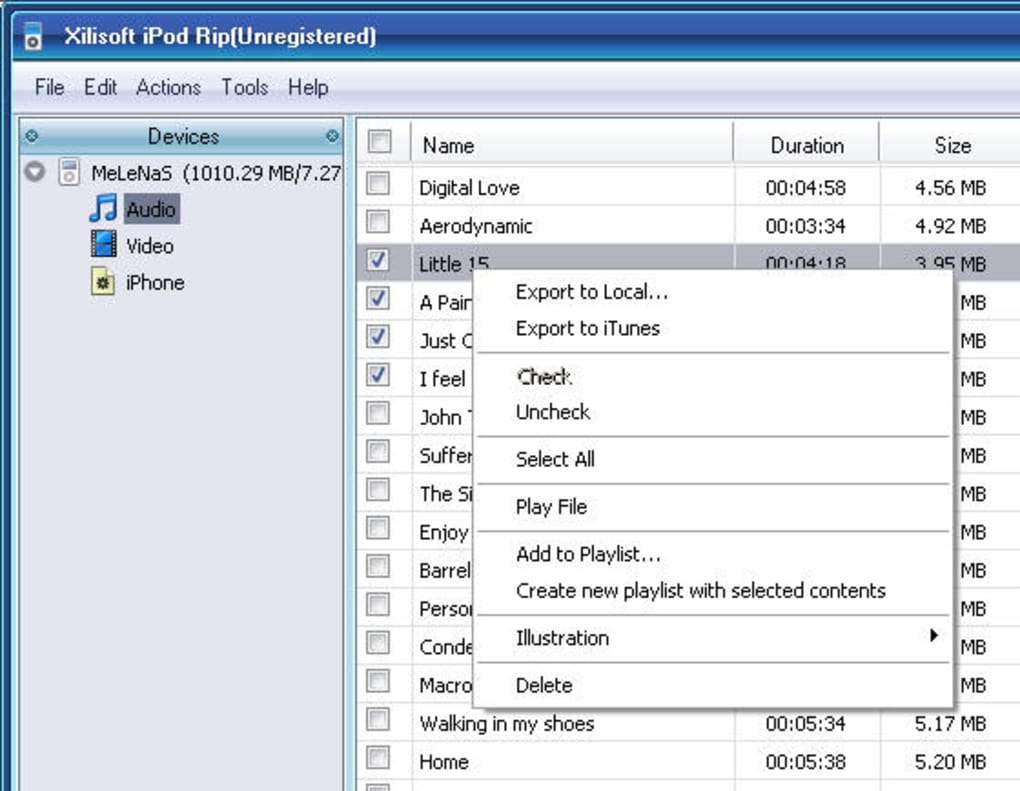
Copy from Device to PC: Connect your iPod/iPhone, click the “Import” button, and drag the desired songs or videos into the transfer list. The software begins copying instantly and shows a progress bar for each file.
Copy from PC to Device: Use the “Export” button, select the destination folder on your iPod/iPhone, and drop the files you wish to add. Xilisoft iPod Rip updates the device’s playlist automatically, so you can see the new songs appear in the music app right away.
System Requirements & Operating System Support
Xilisoft iPod Rip runs on Windows 7, 8, 8.1, 10, and 11 (both 32‑bit and 64‑bit). The Mac version supports macOS 10.12 Sierra and later. While there is no native Android or iOS app, the Windows/Mac client can communicate with any iOS device connected via USB. Minimum hardware requirements are modest: a 1 GHz processor, 512 MB RAM, and 50 MB of free disk space.
For optimal performance, ensure that your device’s iOS version is up to date and that you have the latest Apple Mobile Device Support drivers installed on Windows. If the device is not recognized, try restarting both the computer and the iPod/iPhone, and verify that the USB cable is functioning correctly.
FAQ & Conclusion: Is Xilisoft iPod Rip Right for You?
Frequently Asked Questions
Can Xilisoft iPod Rip transfer playlists?
Yes, the software preserves existing playlists and creates new ones when you export music from your PC to the device.
Is the free trial limited to a specific number of files?
The trial allows you to transfer up to 10 files per batch. For unlimited batch transfers, you can purchase the full license.
Does Xilisoft iPod Rip support video formats other than MP4?
It primarily supports MP4 and MOV files, which are the standard formats recognized by iOS devices. Other formats must be converted before transfer.
Will the software affect my existing iTunes library?
No. Xilisoft iPod Rip works independently of iTunes and does not modify your iTunes library unless you explicitly import files into iTunes after using the tool.
Is my data safe during transfer?
Yes. The software uses standard USB communication protocols and does not store copies of your media on external servers.
Conclusion & Call to Action
If you need a quick, secure way to move music, video, or playlists between an iPod/iPhone and your computer without the bulk of iTunes, Xilisoft iPod Rip delivers exactly that. Its intuitive interface, fast transfer speeds, and low system impact make it a solid choice for casual users and power users alike. While it lacks some of iTunes’ advanced library features, the trade‑off is a lean, purpose‑built tool that gets the job done without unnecessary clutter. Download the free trial today, experience the instant syncing for yourself, and decide whether the full version is worth the modest upgrade.
Guides & Tutorials
How to install Xilisoft iPod Rip
- Click the Download button above.
- Once redirected, accept the terms and click Install.
- Wait for the Xilisoft iPod Rip download to finish on your device.
How to use Xilisoft iPod Rip
This software is primarily used for its core features described above. Open the app after installation to explore its capabilities.
User Reviews
No reviews yet. Be the first to share your experience.
You may also like
more
Llama 2
Free-to-use large language model As the new addition to Meta’s arsenal of langua...

NotebookLM
Revolutionizing the note-taking and idea-generation process NotebookLM is an exp...

Github co pilot
AI-inspired software development and coding platform GitHub Copilot is a browser...

Google Gemma
Google’s lightweight AI models Introducing Google Gemma , a family of cutting-ed...

AI Image Enlarger
A free app for Windows, by ai-image-larger. AI Image Enlarger is a free software...

DALL E
AI-driven text-to-image transformation engine DALL·E is a free graphic and desig...